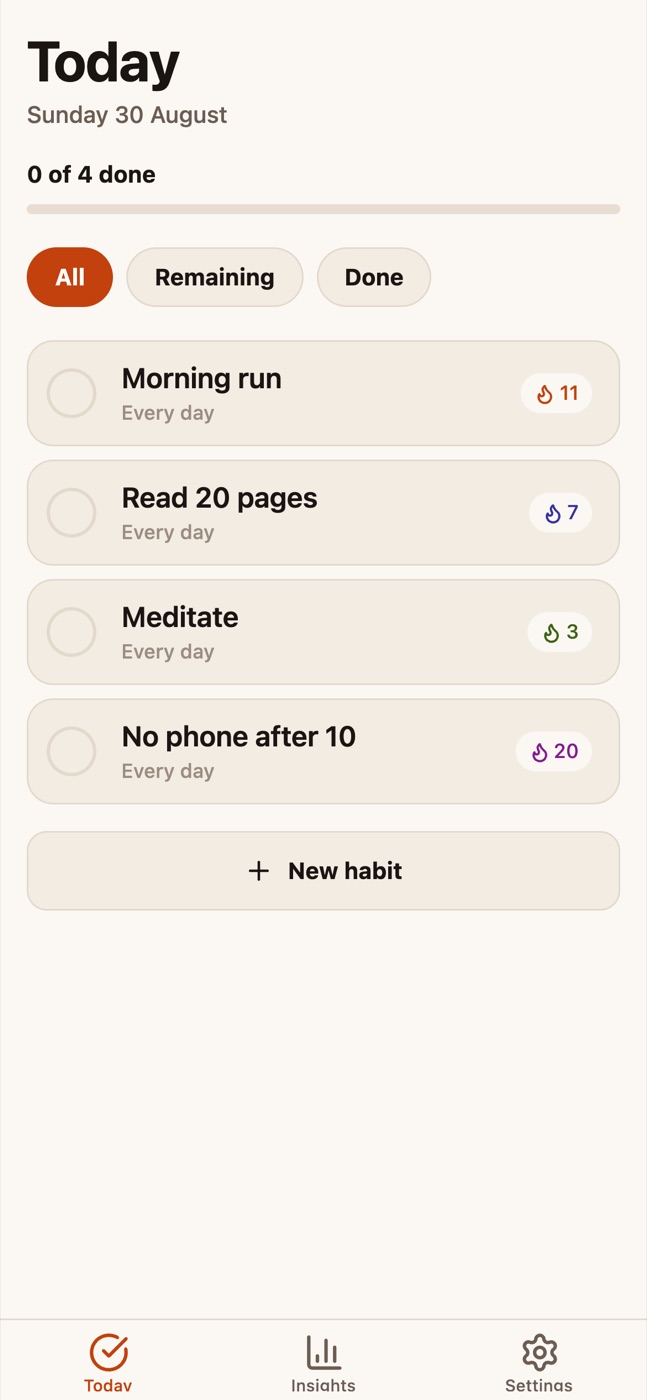
Habit & Streak Tracker
A daily habit tracker with streaks, a 12-week activity grid and history that persists on the device
Vibely · iOS and Android
Creates your own copy. Free to start.
Designed for
- Habit, streak and routine trackers
- Any app whose home screen is a checklist that resets daily
- Mood, symptom, practice and training logs
- Learning the shape of a real Expo Router app before building your own
Key highlights
About this template
A habit tracker with the parts that usually get skipped already working: the streak that does not reset at midnight, the activity grid that tells a weekend apart from a missed day, and a store that survives a refresh without flashing an empty screen on the way back.
Every screen is built from the template's own kit — Button, Card, Chip, ListRow, SectionHeader, Sheet, TextField — and every colour comes from the token file. Restyling the whole app is an edit to thirty values in src/constants/theme.ts; nothing on any screen holds a hex.
It ships with five sample habits and about three months of plausible history, generated relative to the day you open it. Delete src/lib/habit-seed.ts and new users get the empty state instead.
Best use cases
A habit or routine tracker
The default. Daily, weekdays-only and weekly cadences are already handled, including the rule that a weekday habit does not lose its streak over a Saturday.
A practice or training log
The same shape with a different noun. Rename the habit to a drill or a lift and the grid becomes a training history.
A mood or symptom diary
Swap the check circle for a scale and the heatmap already reads intensity — the grid renders any per-day value.
A starting point for any list-and-detail app
Tabs, a pushed route, a bottom-sheet form, local persistence and full empty/loading states. Most mobile apps are this skeleton with different data.
Getting started
Step 1: Remix this template
Click Use template. Vibely copies the source into a new project, boots an Expo sandbox and brings the preview up — scan the QR code to run it on your own phone.
Step 2: Describe your first change
Tell the chat what you want in plain language. It reads the project and edits the files, and you can open the code and edit it directly at any point.
Step 3: Choose the direction
src/constants/theme.ts holds both colour schemes and the five habit tints. Change the accent and the tab bar, every button, every streak badge and the grid all move with it.
Step 4: Change what a habit is
src/lib/habits.ts is the whole data model plus every streak and schedule rule, with no React in it. Add a field there and the screens follow.
Step 5: Replace the sample data
src/lib/habit-seed.ts generates the first-run habits relative to today. Delete it and the app opens on its empty state.
Step 6: Sync across devices
src/lib/habit-store.tsx is the only file that knows where data lives. Ask the chat to add Supabase and sign-in, and swap AsyncStorage for queries there — no screen changes.
Publish to the stores
Set the name and icon in app.json, then use Publish to run an EAS build for TestFlight or Google Play.
Conclusion
A habit tracker is the smallest app that still needs everything a real one does — a daily list, a detail screen, a form, persistence and four states per screen. This one has all of it working, so what is left is deciding what you are tracking.
Features & capabilities
Streaks that behave
An unfinished today does not break the streak, and days a habit was not scheduled are skipped rather than counted as misses — so a weekdays-only habit survives the weekend.
Activity grid
Twelve weeks on Insights, sixteen on the detail screen, one column per calendar week. Done, missed and not-scheduled are three distinct states, not two.
A check control worth tapping
A 44pt target around a 30pt ring, a spring that overshoots slightly on completion, and a haptic that fires when you complete something — never when you undo it.
Persists, without the flash
AsyncStorage behind a hydration guard: screens show their loading state until storage has been read, so a cold start never flashes an empty list.
Sheets, not extra screens
Creating and editing happen in a bottom sheet over the list, and destructive actions confirm in one too — never Alert.alert, which blocks the bridge and freezes the web preview.
Archive without losing history
An archived habit leaves Today and keeps every check-in, so the grid stays honest and it can be restored from Settings.
One palette, both schemes
Thirty semantic tokens plus five habit tints, each defined for light and dark. Habits store a tint by name, so a restyle moves them too.
Announces properly
The check circle is a real checkbox with a checked state, the grid is one summarised node instead of eighty-four, and the colour picker shows selection with a ring rather than hue alone.
Correct navigation shape
A Stack at the root with the tabs as one screen inside it, so the habit detail route pushes over the tab bar with a real back gesture instead of appearing as a phantom tab.