Project Management Board
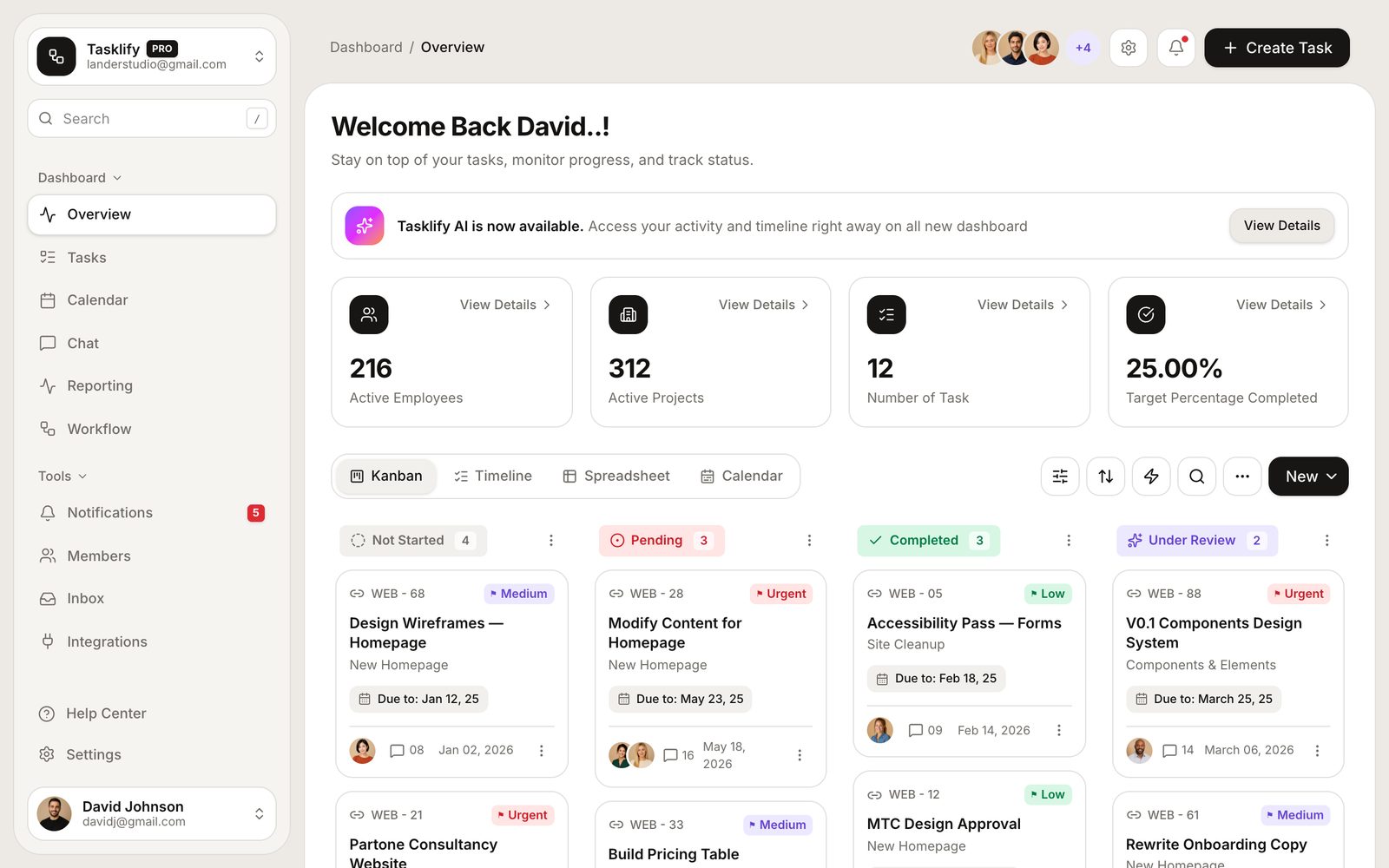
Kanban workspace with drag-and-drop, four board views, filters, automations and reporting
Vibely
Creates your own copy. Free to start.
Designed for
- Teams who want a board that matches how they actually work
- Replacing a Trello or Linear workspace with something you control
- Client projects that need a shared, branded workspace
- Developers who need drag-and-drop that also works on a phone
Key highlights
About this template
A kanban workspace with the four views a real team asks for within a week: the board, a flat task list, a calendar, and reporting that says whether any of it is moving.
Dragging a card is not the only way to move it. The same action is reachable from the keyboard and from a touch fallback, because a board that only responds to a mouse drag is unusable on a phone and unusable to anyone who does not use one.
The board persists to localStorage behind a hydration guard, and every view reads the same store — so a card moved on the board is already moved in the list, the calendar and the charts.
Best use cases
Team sprint board
Columns, assignees, priorities and due dates, with reporting to show what actually closed.
Client project workspace
A branded board you can share with a client instead of adding them to your internal tools.
Personal task system
The same board scaled down to one person, with the views you want and none of the ones you do not.
Editorial or content calendar
The calendar view and status columns map onto a publishing pipeline without any reworking.
Getting started
Step 1: Remix this template
Click Use template. Vibely copies the full source into a new project, boots a sandbox and brings the preview up — you are looking at a running app, not a static mockup, before you have typed anything.
Step 2: Describe your first change
Tell the chat what you want in plain language. It reads the project the same way you would, edits the files and shows you the result in the preview. You can also open the code and edit it directly at any point.
Step 3: Set up your columns
Columns, priorities, labels and the seed tasks live in src/lib/board.ts. Change the workflow there and every view follows.
Step 4: Add your team
Members and avatars come from the same module. Assignment, filtering and the member page all read from it.
Step 5: Tune the automations
The workflow page holds rules that fire on card movement. Add your own, or remove the ones that do not match how you work.
Step 6: Make it multiplayer
Ask the chat to add Supabase and authentication, and the board goes from one browser to a shared workspace.
Publish when it looks right
Publish gives the project a live URL. Connect a custom domain in project settings, or export the whole codebase to GitHub and deploy it yourself — nothing here is locked in.
Conclusion
Every team eventually wants a board shaped slightly differently from the one they are paying for. This is that board, with the drag-and-drop, the views and the reporting already working — and the shape left up to you.
Features & capabilities
Drag-and-drop board
Move cards between columns and reorder within one, with the drop target shown as you go.
Keyboard and touch fallback
Every move a drag can make is also reachable without one, so the board works on a phone and with a keyboard.
Four views of one board
Board, list, calendar and reporting all read the same store — change a card anywhere and it changes everywhere.
Filters and search
Narrow by assignee, priority, label or text, and keep the filter as you switch views.
Automations
Rules that fire when a card moves — the tedious part of running a board, handled.
Reporting charts
Recharts throughput and distribution views, with animation disabled so they render correctly in screenshots and on first paint.
Calendar view
The same tasks placed on their due dates, for work that is scheduled rather than queued.
Members
A member list with roles and workload, wired to assignment and filtering.
Persisted board
The whole board survives a refresh, restored after mount so it never fights hydration.