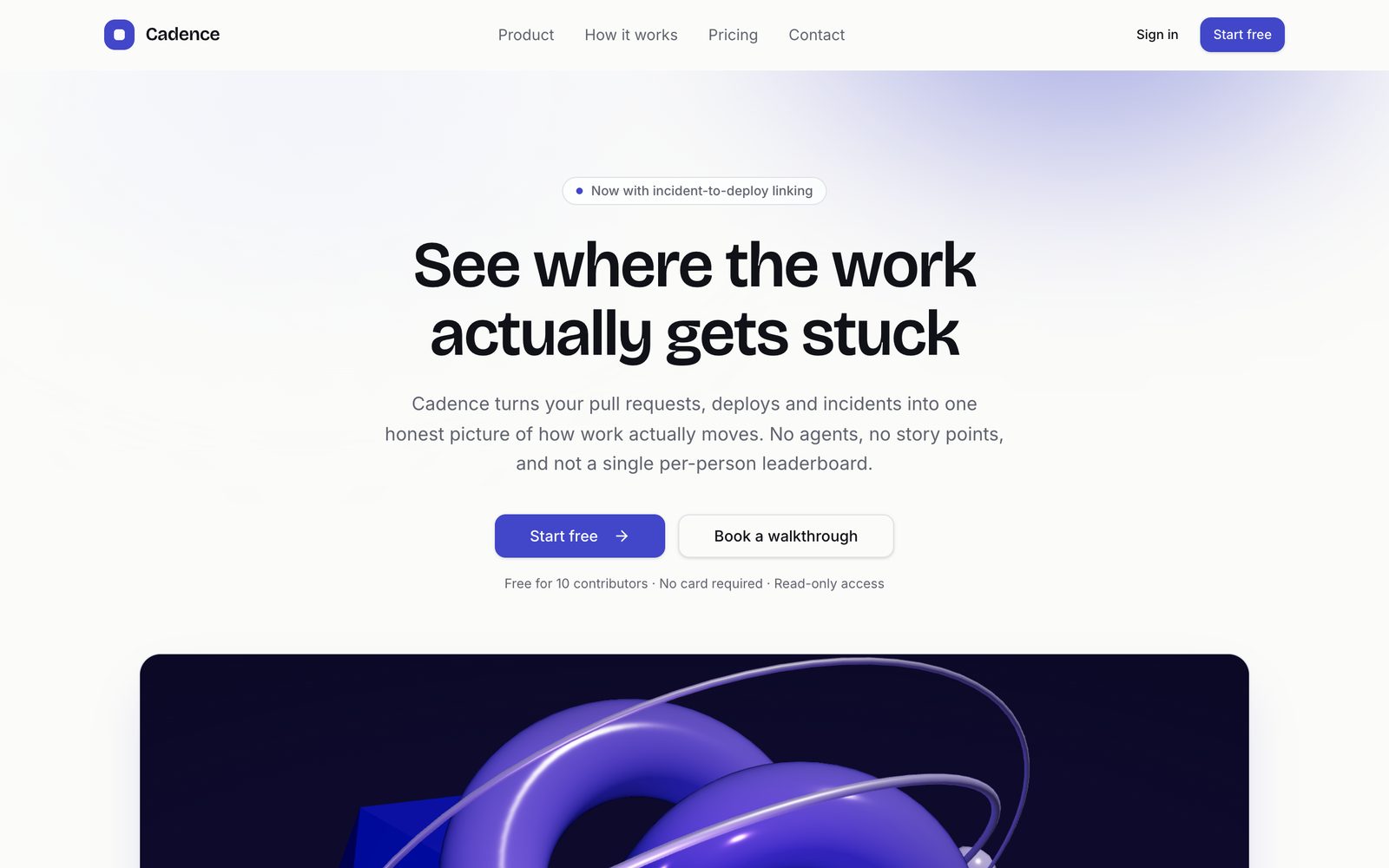
SaaS Landing Page
Marketing site for a software product — 3D hero, feature grid, testimonials, pricing toggle and a working contact form
Vibely
Creates your own copy. Free to start.
Designed for
- Founders who need a credible product site before the first sales call
- Marketing teams replacing a page builder with code they own
- Testing positioning, tier names and CTA copy week to week
- Solo developers who want design quality without hiring for it
Key highlights
About this template
A marketing site for a software product, built as three real routes rather than one long scrolling page: a home page that has to convince, a pricing page that has to be read carefully, and a contact form that has to actually submit.
The hero is a three.js scene. It is lazy-imported, so the ~600kB of 3D never blocks first paint, and it ships with a generated still of the same scene that stands in during server rendering and for anyone who has asked their system to reduce motion. The page is never an empty box waiting for a canvas.
All the words live in one file. Product name, tagline, features, pricing tiers and testimonials come out of src/lib/site.ts, so rewriting the pitch means editing content, not hunting through components.
Best use cases
Product launch site
Ship a page the day you decide on the name. Feature grid, social proof and pricing are already laid out and only need your copy.
Pricing experiments
Tier names, prices, and what each tier includes are data. Change the shape of your pricing without touching a component.
Investor and press page
A polished single-product story with room for metrics and quotes, at a URL you can send before a meeting.
Waitlist or early access
Point the hero CTA and the contact form at a waitlist instead of a signup and the rest of the page still reads correctly.
Getting started
Step 1: Remix this template
Click Use template. Vibely copies the full source into a new project, boots a sandbox and brings the preview up — you are looking at a running app, not a static mockup, before you have typed anything.
Step 2: Describe your first change
Tell the chat what you want in plain language. It reads the project the same way you would, edits the files and shows you the result in the preview. You can also open the code and edit it directly at any point.
Step 3: Rewrite src/lib/site.ts
Product name, nav links, hero copy, features, testimonials and pricing tiers are all in this one module. Editing it updates every page that reads from it.
Step 4: Set your pricing
Tiers carry a monthly and an annual price. The toggle recomputes the savings line from those two numbers, so you never hand-maintain a percentage.
Step 5: Make the hero yours
Change the scene's colours and geometry in hero-scene.tsx, or drop the 3D entirely and put an image or product screenshot in its place — the poster fallback shows you the shape to match.
Step 6: Wire the contact form
The form already validates and reports errors. Connect Supabase, or point the submit handler at your CRM or an email service, and it starts delivering.
Publish when it looks right
Publish gives the project a live URL. Connect a custom domain in project settings, or export the whole codebase to GitHub and deploy it yourself — nothing here is locked in.
Conclusion
A landing page is usually the first thing you need and the last thing you want to build. This one starts finished — real motion, real pricing logic, a form that validates — so the work left is saying what your product does.
Features & capabilities
Animated 3D hero
A three.js scene renders behind the headline, lazy-imported so it never blocks first paint.
Poster fallback
Server rendering and reduced-motion visitors get a still of the same scene instead of an empty canvas.
Monthly / annual pricing
One toggle swaps every tier's price and recomputes the savings line from the tier data.
Feature grid
An icon-and-copy grid that reflows cleanly from three columns to one.
Testimonials
Social proof laid out for real quotes with names, roles and companies.
Validated contact form
react-hook-form and zod handle validation and per-field errors before anything is sent.
One content module
Every headline, tier, feature and quote lives in src/lib/site.ts. Components read it and nothing else.
Responsive to 390px
Navigation, hero, grid and pricing table each have a real mobile layout, not a squeezed desktop one.
Route-level code splitting
Pricing and contact load on navigation, so the landing page ships only what it needs.