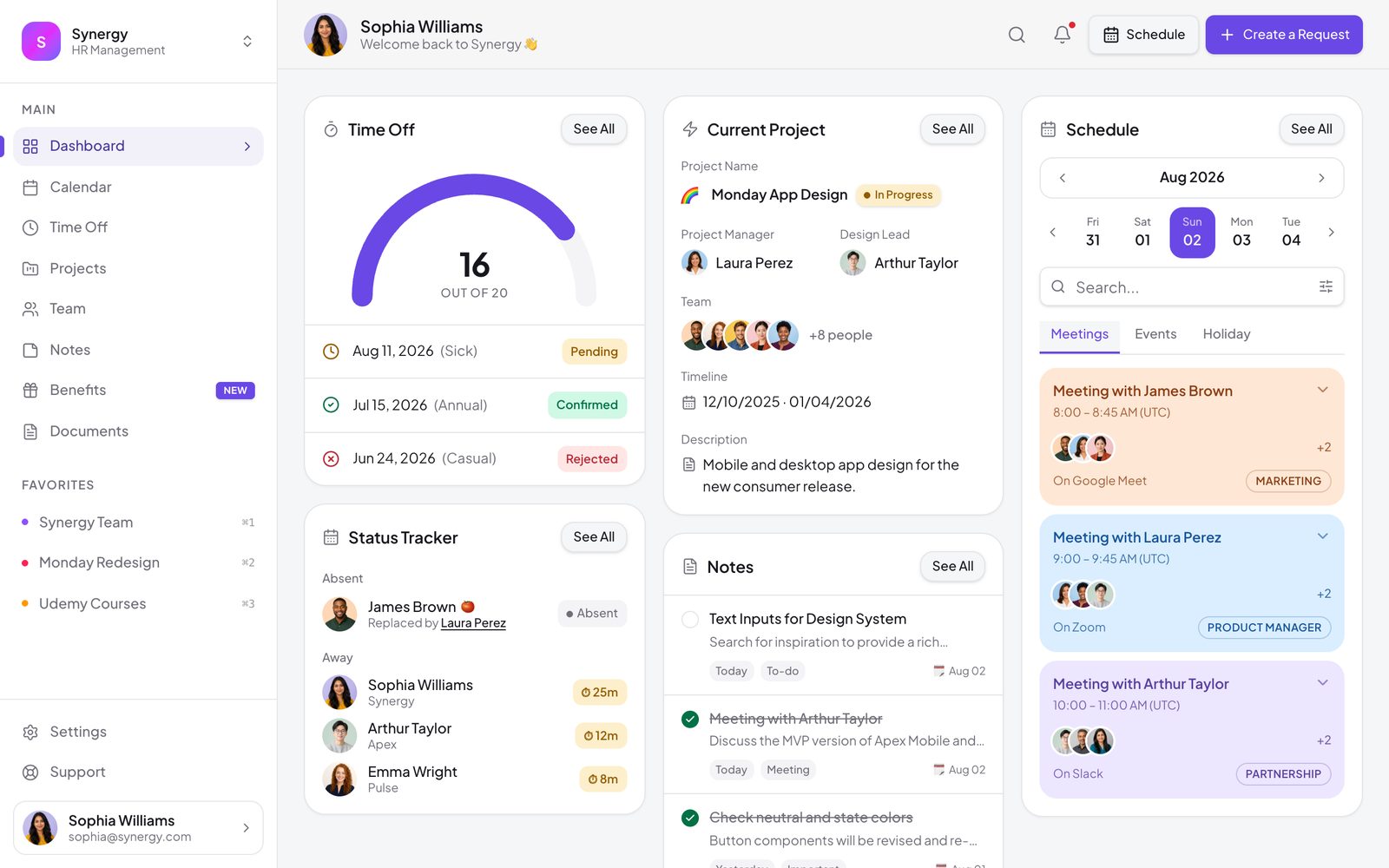
HR Management Dashboard
People-team workspace — time-off tracking with approvals, team status, projects, notes and a schedule
Vibely
Creates your own copy. Free to start.
Designed for
- People and ops teams outgrowing a spreadsheet
- Internal tools that need to look considered, not improvised
- Small companies tracking time off without a full HRIS
- Developers who need an eight-page admin shell already laid out
Key highlights
About this template
An eight-page workspace for the team that runs the team: time off, who is in today, what everyone is working on, and the documents nobody can ever find.
Time off is the part that carries real logic. A request is checked against the requester's remaining allowance before it can be submitted, moves through an approval step, and updates the balance when it is granted — the rules an HR tool is judged on, rather than a form that accepts anything.
Every page hangs off one app shell with a persistent sidebar, so adding a ninth section is a route file and a nav entry. State persists to localStorage behind a hydration guard, which means a half-finished request is still there after a refresh.
Best use cases
Time-off tracking
Requests, approvals and remaining balance in one place, with the allowance enforced rather than trusted.
Team directory and status
Who is here, who is away, and what they are working on — the question asked most often and answered worst.
Lightweight project tracking
Enough structure to see what is in flight without imposing a full project tool on a small team.
Internal knowledge base
Benefits, policies and documents in a place people can actually navigate.
Getting started
Step 1: Remix this template
Click Use template. Vibely copies the full source into a new project, boots a sandbox and brings the preview up — you are looking at a running app, not a static mockup, before you have typed anything.
Step 2: Describe your first change
Tell the chat what you want in plain language. It reads the project the same way you would, edits the files and shows you the result in the preview. You can also open the code and edit it directly at any point.
Step 3: Put your people in
The team, allowances, projects and documents are seeded in src/lib/hr.ts. Replace the seed data and all eight pages follow.
Step 4: Set your leave policy
Allowances and the approval rule are explicit in the store. Change the numbers, or the rule, without rewriting the pages that read them.
Step 5: Move to a real database
Ask the chat to add Supabase. The store is the only thing that reads data, so the swap touches one layer.
Step 6: Add authentication
Approvals only mean something once people sign in. Adding auth turns the approver column into a real permission.
Publish when it looks right
Publish gives the project a live URL. Connect a custom domain in project settings, or export the whole codebase to GitHub and deploy it yourself — nothing here is locked in.
Conclusion
Internal tools get judged on whether the rules hold, not on how they look — but the ones people actually use manage both. This starts with the workflow already correct and a shell worth extending.
Features & capabilities
Time-off requests
Book leave against a real allowance, with the dates and day count worked out for you.
Approval workflow
Requests move through pending, approved and declined, and the balance only moves when one is granted.
Allowance guard
A request that would exceed the remaining allowance is refused at submission, not discovered later.
Balance gauge
A hand-drawn SVG arc showing days used against days remaining.
Team directory
Everyone, their role, and whether they are in or away today.
Filterable schedule
The calendar filters by person and by kind of absence, so it stays readable at team size.
Project tracking
What is in flight, who owns it and where it has got to.
Shared notes
A team notes surface that persists, for the things that never fit in a ticket.
Benefits and documents
Two pages for the policies and files people ask about every month.