Wedding Website
Elegant wedding website — live countdown, our story timeline, weekend schedule, travel and hotel block, registry, FAQ and a validated RSVP with per-guest meal choices
Vibely
Creates your own copy. Free to start.
Designed for
- Couples who want a wedding site that looks like their invitation, not a listing on someone else's platform
- Destination weddings with a long weekend of events, hotel blocks and travel to explain
- Wedding planners and stationers setting up sites for their clients
- Developers who need an RSVP form with per-guest options validated properly
Key highlights
About this template
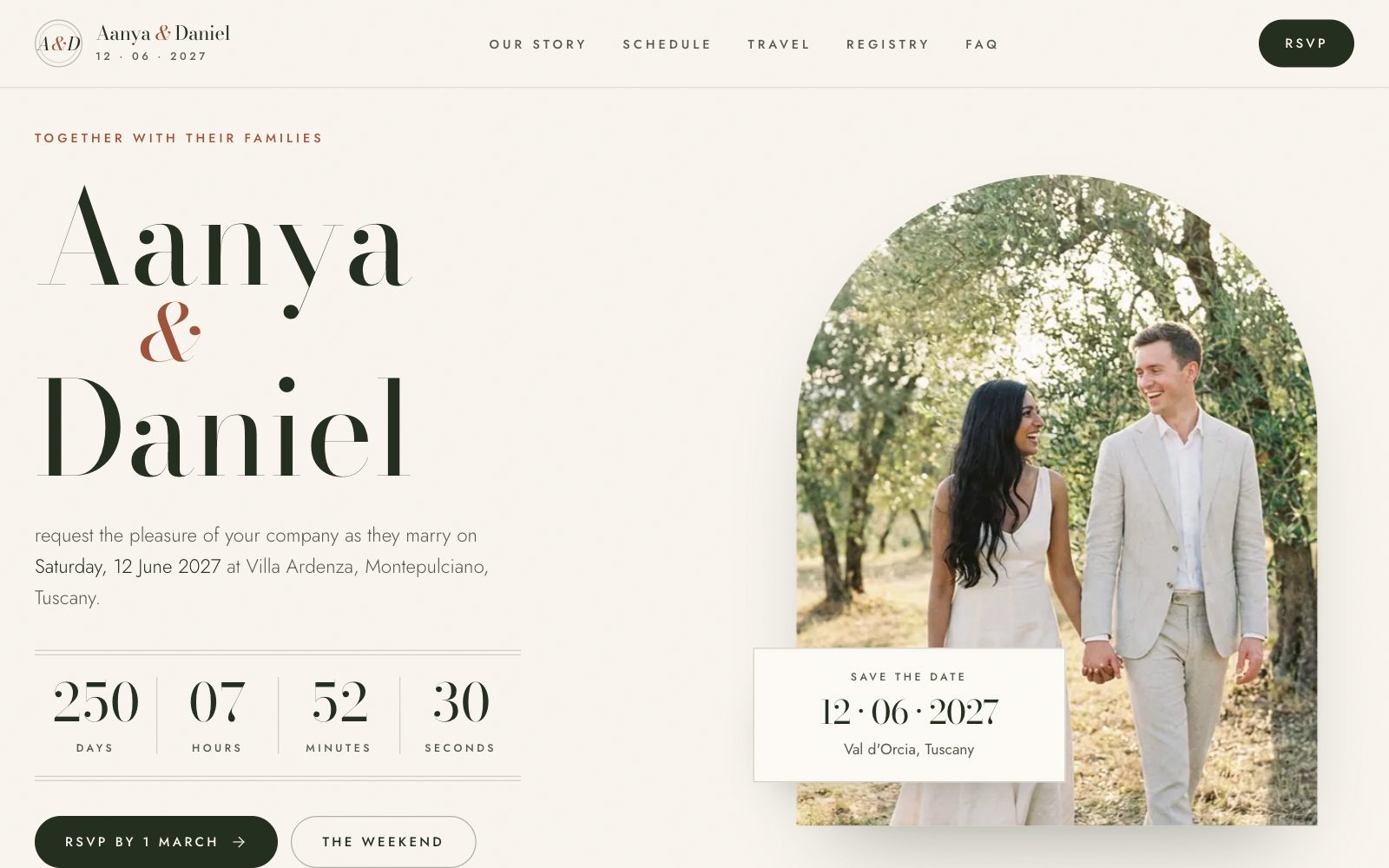
An editorial wedding website for a fictional couple marrying in Tuscany: a hero with the names set like an invitation and a live countdown, a four-chapter story timeline, the full weekend schedule, travel and hotel details, a registry, an FAQ and an RSVP form that actually validates and remembers a reply.
The countdown is hydration-safe. The server cannot know the visitor's clock, so the first render on both server and browser shows placeholders, and the real days, hours, minutes and seconds arrive from an effect after mount. The ceremony time is stored with its UTC offset, so the number is right wherever the guest is reading it from, and it turns into a just-married message once the date passes.
The RSVP is built on react-hook-form and zod. Choosing to attend opens the party section: pick how many guests (up to the limit you set), name each one and choose a meal per guest, then add dietary notes and a song request. Errors appear inline next to the field that caused them. The reply is saved in the guest's browser through a provider with a hydrated flag, shown back on a confirmation screen, and can be edited or replaced later — until you connect a backend it stays in that browser rather than reaching you.
Best use cases
Your own wedding
Swap in your names, date, venue and photos and you have a complete wedding site at your own URL, with no platform branding.
Destination weekend
Multi-day schedules, airports, trains, shuttles and a hotel block with copyable booking codes are already laid out for guests travelling in.
Planner or stationer offering
Remix it per client and match the site to the printed suite by changing the colour tokens and the two fonts.
Any RSVP-driven event
Milestone birthdays, anniversaries and reunions need the same thing: a date, a schedule and a form that collects who is coming and what they eat.
Getting started
Step 1: Remix this template
Click Use template. Vibely copies the full source into a new project, boots a sandbox and brings the preview up — you are looking at a running app, not a static mockup, before you have typed anything.
Step 2: Describe your first change
Tell the chat what you want in plain language. It reads the project the same way you would, edits the files and shows you the result in the preview. You can also open the code and edit it directly at any point.
Step 3: Put your details in
Names, date, venue, story chapters, events, hotels, registry links, meal options and FAQ all live in src/lib/wedding.ts. Change them there and all seven pages follow, including the countdown and calendar files.
Step 4: Rebrand it
The palette is a set of named stationery tokens — paper, linen, sage, clay, olive — in src/styles.css, alongside the display and body fonts. Change them once to match your invitations.
Step 5: Add your photography
Upload your engagement photos or ask the chat to generate imagery. Every photo is a file in src/assets imported from the same data module.
Step 6: Collect RSVPs for real
Replies are saved in each guest's browser until a backend is connected. Connect Supabase and point the provider's save function at a table so every RSVP reaches you instead of staying on the guest's device.
Publish when it looks right
Publish gives the project a live URL. Connect a custom domain in project settings, or export the whole codebase to GitHub and deploy it yourself — nothing here is locked in.
Conclusion
A wedding site has a short job with a lot of small details in it — a countdown that is right in every timezone, a schedule guests can save to their calendar, booking codes they can copy, and an RSVP that knows how many people are coming and what each of them eats. Those are the parts already built here.
Features & capabilities
Hydration-safe countdown
Days, hours, minutes and seconds computed on the client after mount from a pinned, offset-aware ceremony time, so server and browser never disagree.
Story timeline
Four chapters on an alternating timeline with a photo each, ending in a full-bleed quote.
Weekend schedule
Events grouped by day with time, place, address, dress code and a map link, plus an .ics download for one event or the whole weekend.
Travel and hotel block
Airports, trains and shuttles, and hotel cards with rates, cut-off dates and booking codes guests can copy in one tap.
Per-guest meal choices
Pick a party size and every guest gets their own name field and meal choice, validated only when attending.
Validated RSVP
react-hook-form with a zod schema, inline errors beside each field, a saving state and a confirmation screen.
Editable saved reply
Replies persist in the guest's browser through a provider with a hydrated flag, and can be edited or replaced — until a backend is connected they are not sent anywhere.
Registry and honeymoon fund
A featured honeymoon fund with example experiences and registry cards that link out to each store.