Developer Portfolio
Personal portfolio for a developer or design engineer — selected work, filterable project index, case studies, a printable CV and a validated contact form
Vibely
Creates your own copy. Free to start.
Designed for
- Software engineers who want a personal site that shows the work, not just a list of links
- Design engineers and front-end developers presenting case studies to hiring managers
- Freelancers and contractors who need a credible site and an enquiry form
- Students and career-changers building their first portfolio website
Key highlights
About this template
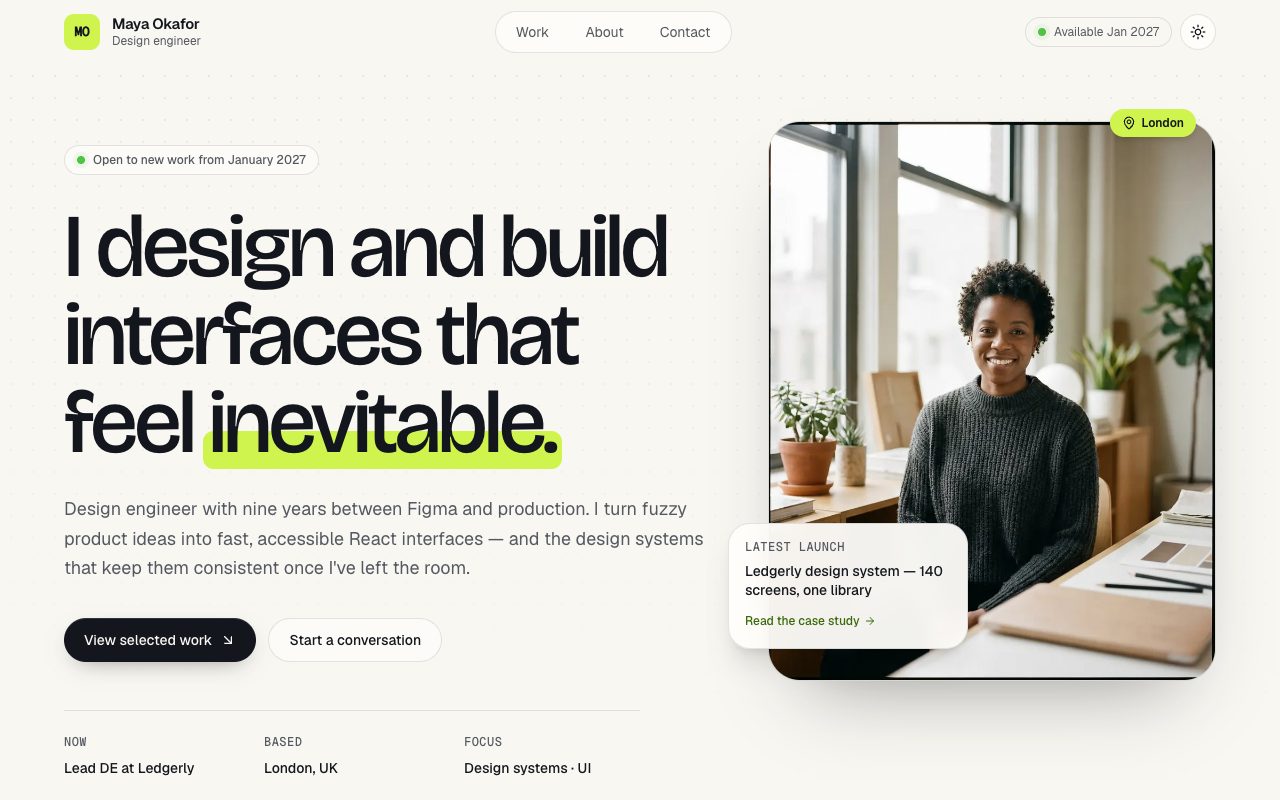
A personal portfolio for a developer or design engineer, built as a real five-route app rather than a single scrolling page: a home page with selected work, stack and experience; a project index; one case study per project; an about page that doubles as a CV; and a contact page.
The project index filters by tag, and the active filter lives in the URL search params — /projects?tag=React is a link you can send to someone, and it survives a refresh and the back button. Each case study is a dynamic route with the problem, your role, the stack, measurable outcomes, a gallery and outbound links, and an unknown slug renders a proper not-found page instead of a blank one.
The about page prints. Download CV calls window.print(), and a print stylesheet strips the navigation, decoration and colour so the same content comes out as a clean ink-on-white resume — save it as a PDF and you have a CV that never drifts out of sync with your site. Theme choice is remembered in localStorage and applied before first paint, so a returning dark-mode visitor never sees a flash of the light theme.
Best use cases
Developer portfolio website
Show four featured projects up front and the full set behind a filterable index, each with a write-up a hiring manager can actually read.
Personal website and CV in one
Keep your bio, experience, skills, education and talks on one page, and print it as a resume whenever someone asks for a PDF.
Freelance and contract work
Case studies with outcomes and metrics, an availability badge, and a contact form that asks for project type and budget before the first call.
Design engineer or front-end showcase
A considered type scale, tasteful motion and a dark mode that make the site itself part of the argument for hiring you.
Getting started
Step 1: Remix this template
Click Use template. Vibely copies the full source into a new project, boots a sandbox and brings the preview up — you are looking at a running app, not a static mockup, before you have typed anything.
Step 2: Describe your first change
Tell the chat what you want in plain language. It reads the project the same way you would, edits the files and shows you the result in the preview. You can also open the code and edit it directly at any point.
Step 3: Put your content in
Your name, bio, projects, case study copy, skills, experience, education, talks and social links all live in src/lib/portfolio.ts. Every page reads from it, so editing that one file rewrites the whole site.
Step 4: Rebrand through the tokens
The paper-and-chartreuse palette, the radius and the dark theme are oklch tokens in src/styles.css, and the fonts are set there too. Change the accent once and every button, badge and highlight follows.
Step 5: Swap in your images
Portrait and project imagery are WebP files in src/assets, imported by name from the data module. Replace a file, or add a new one and point a project at it — a missing image fails the build rather than rendering a hole.
Step 6: Connect a contact inbox
The contact form already validates every field and shows sending and success states. Ask the chat to connect Supabase and store enquiries in a table, or send them to your email, and it starts delivering messages.
Publish when it looks right
Publish gives the project a live URL. Connect a custom domain in project settings, or export the whole codebase to GitHub and deploy it yourself — nothing here is locked in.
Conclusion
Most developer portfolios are either a link list or a template that looks like everyone else's. This one is a small, honest app: your work told as case studies, a CV that prints, a form that validates, and a visual system you can make your own from two files.
Features & capabilities
Selected projects grid
Featured work on the home page in an offset two-column grid, with hover zoom, tag chips and a direct route into each case study.
Tag filter in the URL
Filter the project index by tag with counts on every chip. The filter is a search param, so filtered views are shareable and survive a refresh.
Case study pages
A dynamic route per project with problem, role, stack, outcome metrics, a two-image gallery, outbound links and a next-project link.
Experience timeline
Roles, dates and highlights on a vertical timeline on the about page, with a shorter preview on the home page.
Print-ready CV
Download CV opens the print dialog, and a print stylesheet turns the about page into a clean resume you can save as a PDF.
Validated contact form
react-hook-form and zod with inline errors, a project-type picker, optional budget, a character counter, and sending and success states.
Dark and light themes
A theme toggle on oklch tokens, remembered in localStorage and applied before first paint so there is no flash on load.
Accessible by default
Skip link, visible focus rings, AA contrast in both themes, a mobile menu that closes on Escape, and entrance motion that stands down under reduced motion.