Link in Bio Page
Creator link-in-bio page with a built-in editor — reorderable links, five themes, a featured card, mini shop and a validated newsletter sign-up
Vibely
Creates your own copy. Free to start.
Designed for
- Creators who want their own link page instead of a Linktree subdomain
- Makers and small shops sending Instagram and TikTok traffic to products
- Musicians, writers and coaches collecting newsletter sign-ups
- Developers who need an editable, themeable profile page to build on
Key highlights
About this template
A link-in-bio page for a fictional ceramic artist, Juno Hale, built mobile-first because nearly everyone arrives from a phone: a cover and portrait, a status line, social icons, a stack of link buttons, a featured video card, a four-item shop grid and a newsletter sign-up.
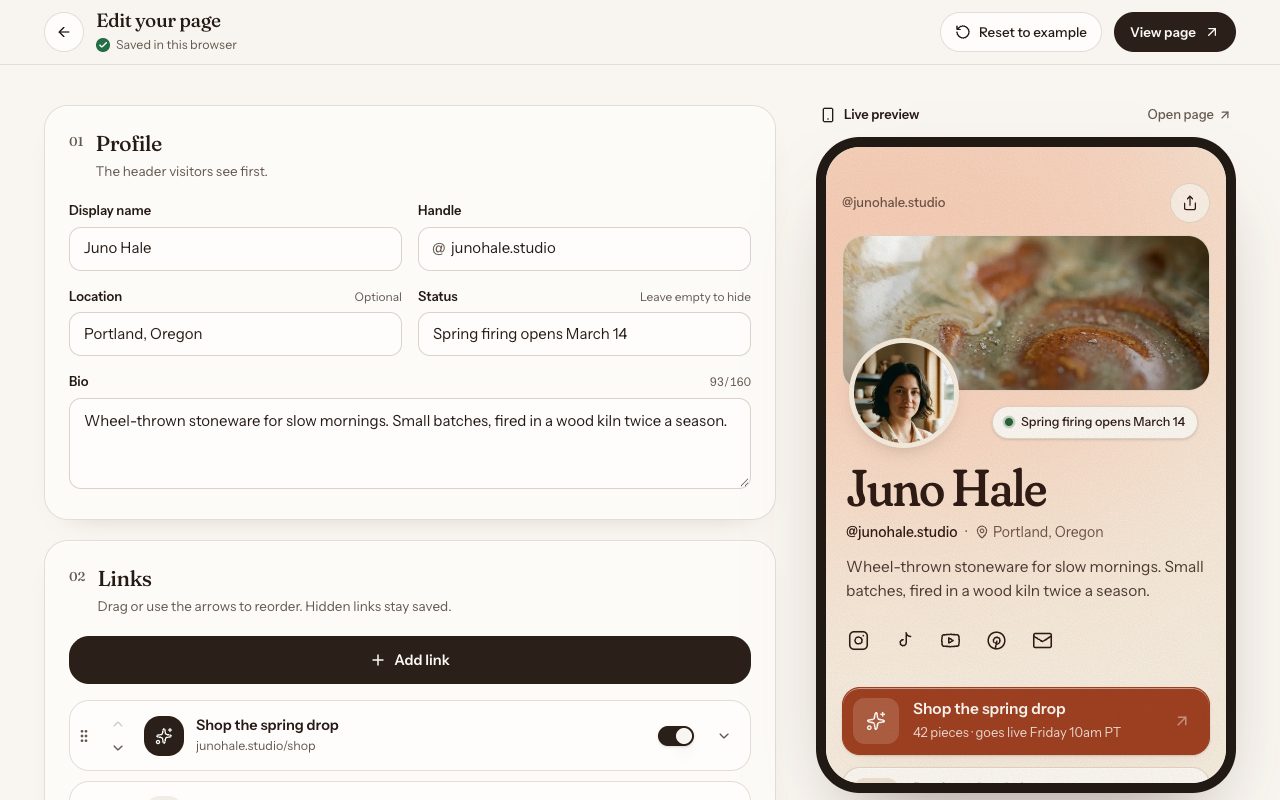
It ships with its own editor at /edit. Change the profile, add links with URL validation, reorder them with up and down buttons or by dragging, hide one without deleting it, and mark one as the highlighted call to action. A live phone-frame preview renders the real page component beside the form, so what you see is exactly what visitors get.
Themes are more than a colour swap. Each of the five sets its own oklch palette, display typeface, name styling and default button shape, and every text pair was checked for WCAG AA contrast. Edits persist to localStorage through a provider that only reads storage after mount, so the server-rendered page never mismatches and the example data can never overwrite a page you have edited. Nothing leaves the browser until you connect a backend.
Best use cases
Creator or artist bio link
One URL for your Instagram, TikTok or YouTube bio that points to everything you are working on right now.
Product drop landing
Highlight the drop as the accent link, feature the launch video and show four pieces from the shelf, each linking out to checkout.
Newsletter growth
The sign-up validates the address, confirms with a success state and lists captured emails in the editor, ready to wire to your mailing list.
A base for a multi-user link product
The page renders from a single state object, so moving it to a database row per user is a contained change.
Getting started
Step 1: Remix this template
Click Use template. Vibely copies the full source into a new project, boots a sandbox and brings the preview up — you are looking at a running app, not a static mockup, before you have typed anything.
Step 2: Describe your first change
Tell the chat what you want in plain language. It reads the project the same way you would, edits the files and shows you the result in the preview. You can also open the code and edit it directly at any point.
Step 3: Put your links in
The example profile, links, socials, featured card, shop items and newsletter copy all live in src/lib/page.ts. Replace the seed there so it is the default for every visitor, or use /edit to try changes in your browser first.
Step 4: Rebrand it
Each theme is a block of oklch tokens and a font pairing in src/styles.css. Adjust one, or add your own and list it in src/lib/page.ts so it appears in the editor.
Step 5: Add your photography
Ask the chat to generate images, or upload your own. The portrait, cover, featured image and product shots are WebP files in src/assets imported by the data module.
Step 6: Connect Supabase
Edits and newsletter sign-ups are stored in the visitor's browser until a backend is connected. Connect Supabase so your edits sync across devices and sign-ups are saved to a table you can export.
Publish when it looks right
Publish gives the project a live URL. Connect a custom domain in project settings, or export the whole codebase to GitHub and deploy it yourself — nothing here is locked in.
Conclusion
A link-in-bio page looks simple, but the details decide whether people tap: a clear focal point, buttons that respond under a thumb, a theme that feels like the creator and an editor that is quick to use. Those parts are built here, ready for your own links.
Features & capabilities
In-browser editor
Edit the profile, status, bio and socials at /edit, with a live phone-frame preview of the real page beside the form.
Reorder, hide and highlight links
Move links with up and down buttons or drag them, toggle visibility without deleting, and pick one link to carry the accent colour.
Five designed themes
Kiln, Celadon, Ember, Riso and Cobalt each set palette, display type and button shape, with text pairs checked for WCAG AA.
Button styles and sections
Soft, pill, outline or hard-shadow buttons, and switches to turn the featured card, shop grid and newsletter on or off.
Featured card
A large image card for the latest video, product or drop, with a play affordance and hover motion.
Mini shop grid
Four products with prices and a sold-out state, each linking out to wherever you actually sell.
Validated newsletter sign-up
Zod-validated email capture with inline errors and a success state; sign-ups are listed in the editor and copy out as CSV.
Saved in the browser
Edits persist to localStorage after mount behind a hydrated flag, so there is no hydration mismatch and no overwritten edits. Connect a backend to sync across devices.